Quick Tab extension makes Google Chrome more usable

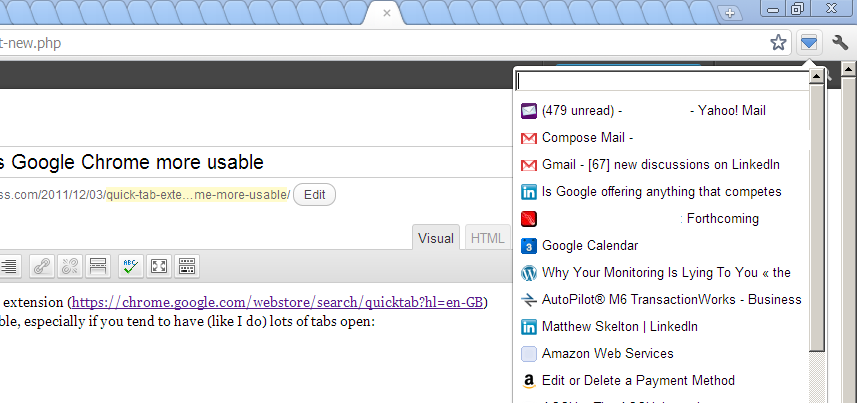
The excellent non-nonsense Quick Tab extension (https://chrome.google.com/webstore/search/quicktab?hl=en-GB) makes Google Chrome much more usable, especially if you tend to have (like I do) many tabs open:

Quick Tab for Google Chrome

Why this isn’t standard in Chrome is baffling, but good work from Tom Lerendu (http://tomlerendu.com/chrome/)

UK Scale Camp 2010 – Braindump

I’ve just returned from UK Scale Camp 2010 (@scalecampuk), organised by The Guardian (and the indefatigable Michael Brunton-Spall, ). Here are some notes:

Overview

I liked the “unconference” format (no formal programme; attendees vote for their favourite sessions in advance), and ended up in four of the many sessions:

  • DevOps on Windows
  • Log Analysis for Search Results
  • DB Changes without Downtime
  • Handling Errors at Scale

Blogger to remove Publish via FTP

As I suspected some time ago, but at a much later time than I thought, Google is finally going to switch off the “Publish via FTP” option from Blogger (http://blogger-ftp.blogspot.com/2010/01/deprecating-ftp.html, http://blogger-ftp.blogspot.com/), causing much ranting on Twitter


The FTP feature was great, in that you got all the benefits of the Blogger editor interface, but all the files were published as flat files to a custom web server. Better still, you could cajole Blogger into saving the files as PHP, thereby providing a cunning integration with flat-HTML websites, without the use of a database or blogging software installed on the server.

Apparently, this caused Blogger a great deal of headache, particularly in resolving support incidents: only .5% of active blogs used FTP for publishing (although I bet all those were “real” blogs, rather than spam or SEO-drivers).

I think this means we’ll need to install the blogging software on our servers, software such as WordPress (http://wordpress.org/). We need a mechanism which allows PHP scripts, so that the content can be embedded within the website itself, not hosted at some crummy http://blog.domain.com/ separate domain. This rules out the Google Custom Domain option.

Less than two months’ notice is not great, but hopefully we should be able to improve on Blogger anyhow.

WMIC – command-line control of WMI functions

Before Windows PowerShell and all the flexibility (and complexity) that brings, there was WMIC, the command-line client for WMI.

WMIC works out of the box with Windows XP and later (including Server 2003 and Vista), and allows access to operations provided via WMI: “a powerful, user-friendly interface to the WMI namespace”. Upon first use, the WMIC environment is installed:

C:\> WMIC

Please wait while WMIC is being installed...

Several tasks which normally feel very GUI-oriented, such as checking the battery status, are made very “command-line” with WMIC:

C:\> WMIC Path Win32_Battery Get BatteryStatus /Format:List

BatteryStatus=1

In this case, the batter is discharging. You can see the beginnings of PowerShell in the syntax and detailed status/operations available. Another useful command is useraccount, to return details of the user accounts on the system:

C:\> WMIC useraccount list brief
AccountType  Caption                  Domain     FullName       Name   SID
512          SKELTON-M\Administrator  SKELTON-M  Administrator         S-1-5-21-68**03330-*********-839**2115-500
512          SKELTON-M\Guest          SKELTON-M  Guest                 S-1-5-21-68**03330-*********-839**2115-501
...

Or how about terminating a specific process (notepad.exe) from the command-line? Here we go:

C:\> WMIC process where name='notepad.exe' call terminate

Executing (\\SKELTON-M\ROOT\CIMV2:Win32_Process.Handle="4652")->terminate()
Method execution successful.
Out Parameters:
instance of __PARAMETERS
{
        ReturnValue = 0;
};

It’s helpful to install the WMI Administative Tools, so you can explore the WMI namespace and investgate the operations available to you via WMIC. For example, to determine the name of the time zone currently used by the system, use the TimeZone path:

C:\> WMIC Path Win32_TimeZone Get StandardName /Format:List

StandardName=GMT Standard Time

The time zone for my computer currently is “GMT Standard Time”.

For simple operations which do not merit PowerShell scripts or installation, WMIC is a good choice.
Send Large Files (UK Version)

With FTP a bit old-skool (and insecure), and all the firewall problems with FTPS and its variants, online web-based file sharing tools have sprung up over the last few years.

Of these, box.net and yousendit.com are the best known, but suffer a common limitation of many of these services, with small upload sizes (unless you pay), and are based in the US, so upload and download times are increased.

Pando advert

The best UK-based site for sharing large files seems to be DropSend (yes, all the good names have gone), which offers up to 2GB uploads for free, an – crucially for me in terms of respectability – displays its UK registered company number on the home page, unlike some other sites like Pando which seem more like spam factories, with inappropriate adverts (see screenshot).