2012 in review – blog.matthewskelton.net

The WordPress.com stats helper monkeys prepared a 2012 annual report for this blog.

Here’s an excerpt:

600 people reached the top of Mt. Everest in 2012. This blog got about 10,000 views in 2012. If every person who reached the top of Mt. Everest viewed this blog, it would have taken 17 years to get that many views.

Click here to see the complete report.

Festive Graphite Line Art for the Masses

You have an installation of Graphite, a desire to learn more Ruby, and some festive spirit – what emerges?

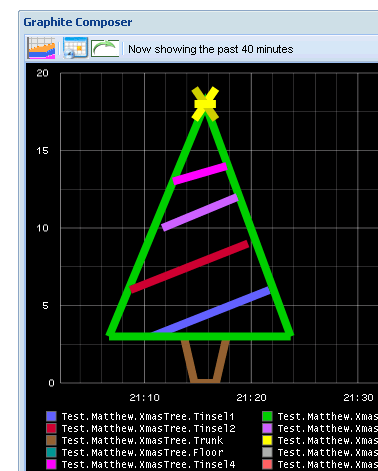
An xmas tree drawn using proper metrics via the Ruby graphite gem, of course!

Xmas tree plotted using Graphite

The magic happens with the Graphite::Logger class, because we can log metrics at specific points in time:

logger.log(when,{"Branches1" => 3})

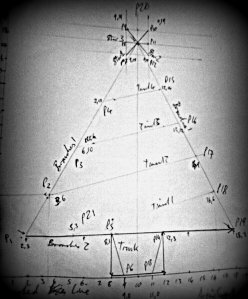
I calculated the points to plot on paper, and found decent Graphite rendering settings by experimentation:

Planning the Graphite Xmas tree

The code is on Github here: https://github.com/matthewskelton/GraphiteGreetings – fork away!

require 'Graphite'
require 'Logger'
# Change these as needed for your environment
server = "my.graphite.server.url"
log = Logger.new(STDOUT)
prefix = "Test.Me.XmasTree."
# Create the logger to send stats to Graphite with specific timings
logger = Graphite::Logger.new(server,log)
# Define the offsets
#
# Use Now as a starting point,
# or set a specific time e.g. Time.utc(2012,12,22,19,10,30)
# We need a 20-minute window to plot
t = Time.now
t0 = Time.at(t.to_i - (20 * 60)) # 20 mins ago
t1 = Time.at(t0.to_i + (60 * 1)) # Left base of tree
t2 = Time.at(t0.to_i + (60 * 3)) # Lower tinsel2
# etc.
# Inject the stats - the order is determined by the default Graphite colours
logger.log(t21,{prefix + "Tinsel1" => 3})
logger.log(t18,{prefix + "Tinsel1" => 6})
# etc.
view raw gistfile1.rb hosted with ❤ by GitHub

I’d love to hear or see any suggestions for improvements to the script. Candles? Snowflakes? Reindeer?! Also, as my Ruby-fu is limited, if there are better ways of interacting with Graphite, I’d love the hear about them (I tried and failed to get activesupport to work on my machine, for example).

Tune logging levels in Production without recompiling code

IAP Software Development Practice JournalThis article first appeared in Software Development Practice, Issue 1, published by IAP (ISSN 2050-1455) 

Abstract

When raising log events in code it can be difficult to choose a severity level (such as Error, Warning, etc.) which will be appropriate for Production; moreover, the severity of an event type may need to be changed after the application has been deployed based on experience of running the application. Different environments (Development (Dev), User Acceptance Testing (UAT), Non-Functional Testing (NFT), Production, etc.) may also require different severity levels for testing purposes. We do not want to recompile an application just to change log severity levels; therefore, the severity level of all events should be configurable for each application or component, and be decoupled from event-raising code, allowing us to tune the severity without recompiling the code.

A simple way to achieve this power and flexibility is to define a set of known event IDs by using a sparse enumeration (enum in C#, Java, and C++), combined with event-ID-to-severity mappings contained in application configuration, allowing the event to be logged with the appropriate configured severity, and for the severity to be changed easily after deployment.

Continue reading Tune logging levels in Production without recompiling code

GOOS at 7digital – Code Shapes, the Purpose of Tests, and Logging Done Well

I recently went to a Devs in the ‘Ditch meetup at 7digital to hear Chris O’Dell (@ChrisAnnODell) explain 7digital’s journey to Continuous Delivery and Steve Freeman (@sf105) speak on GOOS and system testing. We had some useful discussions on dependency injection and how to use logging well, and Steve’s perspectives on ‘code shapes’ and the purpose of tests were revealing.

Continue reading GOOS at 7digital – Code Shapes, the Purpose of Tests, and Logging Done Well

Icebreaker for Agile Retrospectives – Empathy Snap

I was invited by one of our London dev teams to facilitate their retrospective yesterday. I’m far from an expert in facilitating retros, although I enjoy it, and I find that I learn a huge amount from doing so.

Anyhow, I decided to try out my retro ice-breaker exercise which I call Empathy Snap, the aim of which is not only to discover the important features (‘big hitters’) of the last iteration for each team member, but also to see how well team members are aware of the big hitters of their fellow team members. In this way, aspects of the team dynamic can be explored, and dialogue is opened up in a way which immediately requires consideration of others – a useful starting point for a retrospective.

Empathy Snap works like this:

  1. Each team member gets two index cards and a marker pen.
  2. On the first card they write their name at the top and place this card on the table or hand it to the facilitator.
  3. On the second card, hidden from the others, they write the ‘big hitter’ (good or bad) for them from the last iteration, and keep this hidden from view for the time being.
  4. Once all team members have written their ‘big hitter’, each team member takes a name card from the pile, ensuring they do not have their own name card.
  5. On this card, they write what they think is the ‘big hitter’ for the person whose name is on the card, and keep the card. Essentially, they try to guess what that person has written on their hidden card.
  6. Once all the ‘name cards’ have been completed with a ‘big hitter’, a team member reads out the name of the team member written on the card and their guess at the ‘big hitter’ for that person.
  7. The named person then reads out what their big hitter actually was.
  8. If there is a match, then SNAP!
  9. The exercise continues until all team members have read out their guess and have responded with their actual big hitter

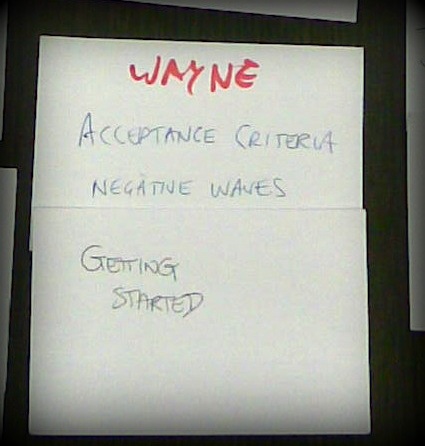
We had one SNAP out of the team of 8 (the red asterisks), but the mismatches also provide very useful insights into the team dynamic:

Empathy-Snap-SNAP  Empathy-Snap-mismatch

The team found it useful, so I think we’ll try it next time too. A variation of the exercise can use separate cards for ‘good’ and ‘bad’ big hitters, so doubling the number of cards, and requiring each team member to decide on a good and a bad thing for the person they are considering.

Update: a version of Empathy Snap is featured in the book Fun Retrospectives by @paulocaroli and @caetano_tchttps://leanpub.com/funretrospectives

Update 2: Steve Carter used Empathy Snap while expanding a team:

https://twitter.com/sweavo/status/524224399420174336

Update 3: Guillaume Charmetant evolved the ‘SNAP’ with a ‘high five’:

Update 4: 2017-05-17 – edited the order of the cards to be Name then Big Hitter following feedback at an agile coaching weekend. This made the exercise clearer for people taking part.

Update 5: the Empathy Snap exercise is included in an academic paper from 2015 (!). See Jovanovic, Milos, Antoni-Lluís Mesquida, and Antònia Mas. 2015. ‘Process Improvement with Retrospective Gaming in Agile Software Development’. In Systems, Software and Services Process Improvement, 287–94. Springer, Cham. doi:10.1007/978-3-319-24647-5_23.

Update 6: in the UK, ‘Snap’ is a children’s card game where you try to match pairs of cards. When you get a match, you shout “SNAP!”.